Why I decided to build my own OpenID Connect Identity Provider from scratch, what it does, and how I approached the initial design.
What Is an OIDC Identity Provider?
OpenID Connect (OIDC) is an identity layer built on top of OAuth 2.0. The distinction is subtle but important: OAuth handles authorization — “what are you allowed to do?” — while OIDC handles authentication — “who are you?”
An Identity Provider (IDP) is the server at the center of all of this. It’s responsible for authenticating users, issuing tokens, and giving other services a trusted answer to the question “is this person who they say they are?” You’ve interacted with IDPs countless times without thinking about it — every time you click “Login with Google” or “Continue with GitHub”, there’s an IDP running that whole flow behind the scenes. Well-known self-hostable examples include Keycloak, Dex, and Authentik.
The core flow this series focuses on is the Authorization Code Flow with PKCE — the standard, modern approach for securely authenticating users in web applications. There are other flows too, and yes, some of them are a bit cursed. We’ll get there.
Why Build Your Own?
For any serious production use case — don’t. Just don’t.

Keycloak is battle-tested, feature-rich, and handles edge cases you haven’t even considered yet. Auth0 and similar managed services take the entire operational burden off your plate. These tools exist for good reason, and reinventing them for a real business is a fantastic way to have a very bad time.
But that wasn’t the point. I wanted to know what actually happens inside one of these things: the token lifecycle, the cryptographic signing, the session management, the spec compliance, and all the places where things can quietly go wrong. The best way I know to deeply understand something, and learn how to break it, is to build it.
So here we are.
Scope and Goals
This is a learning project first and a functional piece of infrastructure second. I tried to keep the scope tight so I’d actually finish it — a lesson learned from approximately seventeen other unfinished projects i have laying around.
- Authorization Code Flow with PKCE — the standard, secure flow for browser-based apps
- Self-hostable on my own infrastructure — no managed services, fully reproducible deployments
- Integrate with self-hosted services — specifically Grafana and similar tools that support OIDC login
- Learn the protocol inside and out — every moving part, not just the happy path
Non-goals include enterprise federation, SCIM provisioning, multi-tenant support, and anything else that would turn this into a second job. This is a single-tenant IDP for personal infrastructure — not a product, not a startup, just a very elaborate way to learn things.
High-Level Architecture
At a high level, the system looks like this:
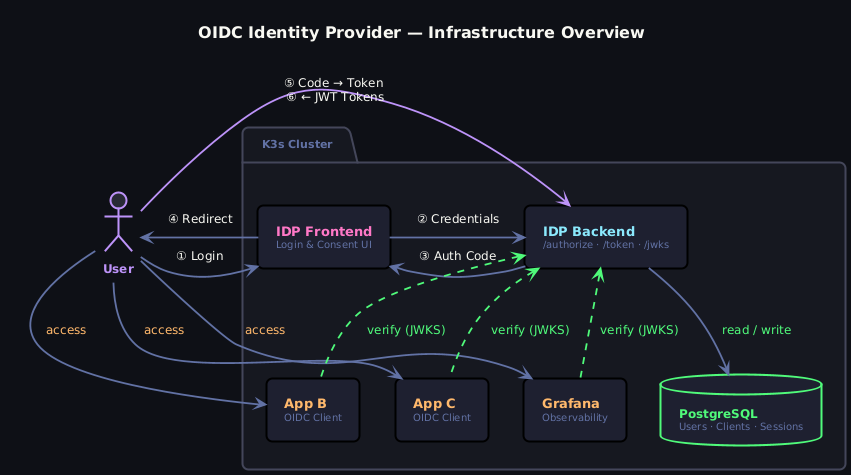
Let’s walk through what’s actually happening here.
①–⑥ The Auth Flow
The Authorization Code Flow with PKCE. The user hits the IDP Frontend — a small, dedicated UI service for the login and consent screens. It forwards the credentials to the IDP Backend, which does all the actual heavy lifting: validating credentials against PostgreSQL, managing sessions, and ultimately handing back an authorization code. The user’s browser gets redirected with that code, exchanges it directly with the IDP Backend, and receives the JWT tokens.
The IDP Backend
The heart of the whole thing. It exposes three endpoints that matter:
| Endpoint | Purpose |
|---|---|
/authorize | Kicks off the auth flow |
/token | Handles the code exchange |
/jwks | Publishes the public keys for token verification |
That last one is the elegant part. Because we’re using asymmetric signing (RS256), the private key never leaves the IDP. Any service that wants to verify a token just fetches the public key from /jwks and checks the signature locally — no round-trip to the IDP required, no shared secrets flying around.
Downstream Services
Grafana, App B, App C — just regular OIDC clients. They don’t know or care how the token was issued. They receive a JWT from the user, verify it against the JWKS endpoint, and either let you in or don’t. This is the part that actually makes OIDC useful: you build the auth logic once and every service just trusts the tokens.
PostgreSQL
Sits quietly in the corner storing users and clients. It only talks to the IDP Backend — nothing else touches it directly.
Tech Stack Choices
| Component | Technology | Why |
|---|---|---|
| Server | Java Spring Boot | Comfortable with Java — the goal was to learn the protocol, not a new language |
| Token signing | RS256 (asymmetric JWT) | Industry standard; services can verify tokens without ever touching the private key |
| User store | PostgreSQL | Already running in my cluster — no reason to introduce another dependency |
| Infrastructure | K3s + Kustomize | Lightweight Kubernetes for home infrastructure; Kustomize keeps manifests sane |
The most deliberate choice here was Spring Boot. Yes, it’s heavyweight for a project like this — yes, I know. But familiarity meant I could focus entirely on the OIDC mechanics rather than fighting an unfamiliar framework, and the Spring Security OAuth2 libraries give you helpful building blocks without abstracting away so much that you stop learning anything.
That said, the weight of Spring Boot is also a deliberate future challenge. One goal down the line is to compile the server natively using GraalVM, which should dramatically reduce startup time and memory footprint. Getting a Spring application to cooperate with GraalVM’s native image compilation is its own rabbit hole — one I’m digging for future me to deal with.
What’s Coming Next
This is part 1 of a multi-part series. Here’s the plan, subject to the chaos of real life:
- Part 2: Core server implementation — user and OIDC client management basics
- Part 3: Core IDP backend — the authorization endpoint, token issuance, and JWKS
- Part 4: Frontend, CORS, and other pitfalls.
- Part 5: Infrastructure — deploying on K3s with Kustomize, secrets management, and TLS
- Part 6: Integrating with real services — getting Grafana to actually trust this thing
- Part 7: Lessons learned — (and what I’d do differently)
The source code is available on GitHub. if you want to follow along or judge me. Either way, feedback is welcome.