Running a Honeypot: What the Internet Does When Nobody's Watching
I noticed my services were getting hammered at paths that don't exist. So I built a fake company and waited to see who showed up.

Introduction
A while back I deployed a small service to my cluster. Nothing fancy, no users, not linked anywhere. Just spun up the ingress and went to bed. The next morning I opened the access logs expecting basically nothing and instead got a wall of /wp-admin, /.env, /admin/config.json, /phpinfo.php, on repeat, from a dozen different IPs. First one had landed about ten minutes after the ingress came up. I don’t even run WordPress.
That bugged me. Who’s doing this? How did they find me so fast?
Everyone, basically. Every public IP gets probed constantly by a whole zoo of automated scanners hunting for misconfigured services, leaked credentials, anything that might be worth something to somebody. None of it is aimed at me specifically. It’s just what the internet sounds like when you stop to listen.
I figured if it’s going to happen anyway, I might as well watch it happen on purpose. So I built a honeypot. Five fake German companies on five different subdomains, each with its own convincing login page, sitting there logging every request that came in.
Below: how it works, how I deployed it, and what eventually crawled out of the logs.
Background: The Internet Is Loud
Turns out there’s an actual name for this. People in security call it internet background radiation, borrowed from cosmology — the idea being that there’s always a baseline level of unsolicited traffic flying around the internet that never quite drops to zero.[^1]
The machinery behind it is kind of impressive. ZMap out of University of Michigan can scan the whole IPv4 address space in under 45 minutes from a single machine.[^2][Shodan](https://www.shodan.io/) and Censys keep running continuous internet-wide scans and just index everything reachable. Doesn’t really matter how small or how new your service is, somebody’s catalogue already has it.
What the scanners are typically looking for:[^3]
- Files that naive deployments sometimes leave accessible (
.env,.git/config,wp-config.php,.aws/credentials) - Admin panels (every framework has one, someone always forgets to lock it down)
- Known vulnerability payloads — Log4Shell JNDI strings, PHP shells, Spring Boot Actuator endpoints
- Default credentials on anything that has a login
The annoying thing is that you can not stop any of those scanners from indexing your service and try to find sensitive information. Thats why it is so important that you know what you host before you put it up on the internet.
The point of a honeypot is to have a service that looks legit but it documents every request so that you can actually understand what the noise looks like up close.
Design: A Multi-Persona Trap
So that’s the thing I wanted to build. Honeypots cover a pretty wide range of effort.[^4] On the simple end you have a single open TCP port that just records connection attempts. On the other end, full emulations of real production environments with fake data and everything. Mine sits somewhere in the middle: an actual HTTP server returning plausible HTML on real domains, writing every request straight into Postgres.
Why Five Companies?
Instead of one generic “Login Page” trap, I built five separate company personas, each on its own subdomain:
| Subdomain | Fake Company | Vibes |
|---|---|---|
shop.hjusic.com | NordShop GmbH — Kundenportal | E-commerce |
erp.hjusic.com | Hartmann & Partner KG — ERP-System | Corporate ERP |
portal.hjusic.com | DevStack Solutions — Developer Portal | SaaS startup |
hr.hjusic.com | Hartmann & Partner KG — HR-Portal | HR system |
invoices.hjusic.com | NordShop GmbH — Rechnungsportal | Finance portal |
Each one has its own branding, colors, German copy, and login fields that fit the persona — the ERP wants a vorname.nachname, the HR portal expects a Mitarbeiter-ID, the invoice portal asks for a Kundennummer. I was curious whether a more convincing lure actually pulls in different kinds of traffic than a generic login page would.
The other nice thing about multiple personas is that it lets you split the data later. A scanner that goes specifically after the ERP and probes SAP-related paths is a different beast than one that blasts all five domains with the same generic payloads. With a single target you can’t really separate those.
Implementation
Concretely the whole thing is a single Go binary fronted by an nginx ingress, talking to one Postgres. The interesting pieces are how a request gets matched to a persona, how every request gets logged, how requests get grouped into sessions, and the schema underneath.
Persona Routing
First step on every request, after nginx: figure out which fake company we’re being right now. PersonaMiddleware pulls the Host header, looks up the persona, and stuffs it into the request context so the handlers downstream don’t have to care:
func PersonaMiddleware(next http.Handler) http.Handler {
    return http.HandlerFunc(func(w http.ResponseWriter, r *http.Request) {
        p := persona.FromHost(r.Host)
        next.ServeHTTP(w, r.WithContext(persona.NewContext(r.Context(), p)))
    })
}
The actual resolution is a plain Go map. If the host doesn’t match anything, there’s a fallback “Secure Portal” persona that catches traffic arriving directly by IP:
var known = map[string]Persona{
    "shop.hjusic.com": {
        Slug:                "shop",
        CompanyName:         "NordShop GmbH",
        AppName:             "Kundenportal",
        PrimaryColor:        "#0057b7",
        Subtitle:            "Bitte melden Sie sich mit Ihrem NordShop-Konto an.",
        UsernameLabel:       "E-Mail-Adresse",
        UsernamePlaceholder: "name@nordshop.de",
    },
    "portal.hjusic.com": {
        Slug:                "portal",
        CompanyName:         "DevStack Solutions",
        AppName:             "Developer Portal",
        PrimaryColor:        "#4f46e5",
        Subtitle:            "Sign in to access your pipelines, tokens and deploy keys.",
        // English UI — a German ERP in English would be suspicious
    },
    // ...
}
Logging Middleware
Once the persona is in context, the same middleware stack passes through LoggingMiddleware. This is the part that actually does the honeypot job — every request gets captured and written to Postgres after the response goes out. A few choices I made deliberately:
- Log after the response, not before. The scanner shouldn’t be waiting on my database round-trip just to get its 200 back.
- Cap body reads at 64 KB. Otherwise someone POSTs a 500 MB body to be annoying and the middleware happily buffers all of it into memory.
- Skip
/healthz. The kubelet hits it every ten seconds and I really don’t want a million health-check rows clogging the database.
func LoggingMiddleware(database *sql.DB, next http.Handler) http.Handler {
    return http.HandlerFunc(func(w http.ResponseWriter, r *http.Request) {
        if r.URL.Path == "/healthz" {
            next.ServeHTTP(w, r)
            return
        }

        bodyBytes, _ := io.ReadAll(io.LimitReader(r.Body, 64*1024))
        r.Body = io.NopCloser(bytes.NewBuffer(bodyBytes))

        rec := &ResponseRecorder{ResponseWriter: w, status: 200}
        next.ServeHTTP(rec, r)

        ip := realIP(r)
        sessionID, _ := db.UpsertSession(r.Context(), database, ip, r.UserAgent(), r.Host)
        db.InsertRequestEvent(r.Context(), database, sessionID, db.RequestEvent{
            Domain:         r.Host,
            IP:             ip,
            Method:         r.Method,
            Path:           r.URL.Path,
            Query:          r.URL.RawQuery,
            Headers:        r.Header,
            Body:           string(bodyBytes),
            ResponseStatus: rec.status,
        })
    })
}
Client IPs come from X-Forwarded-For set by the nginx ingress. Without that you’d log the cluster-internal ingress IP for everything, which is useless.
Session Fingerprinting
One row per HTTP hit is great for the raw firehose, but to get any sense of behaviour you need to group those rows into something resembling a session. Cookies are obviously not an option (no real scanner is going to play along with Set-Cookie), so what I used instead is just a hash of the source IP and User-Agent:
func fingerPrint(ip, userAgent string) string {
    h := sha256.Sum256([]byte(ip + "|" + userAgent))
    return fmt.Sprintf("%x", h)
}
No cookies, no server-side session store, every incoming request just resolves to the same row independently. The upsert keeps track of which personas a fingerprint has shown up on:
INSERT INTO sessions (fingerprint, ip, user_agent, domains_visited)
    VALUES ($1, $2, $3, ARRAY[$4])
ON CONFLICT (fingerprint) DO UPDATE SET
    last_seen       = now(),
    request_count   = sessions.request_count + 1,
    domains_visited = CASE
        WHEN $4 = ANY(sessions.domains_visited) THEN sessions.domains_visited
        ELSE sessions.domains_visited || ARRAY[$4]
    END
domains_visited is the column I ended up staring at the most. If a fingerprint turns up on three different subdomains, that’s not generic scanning anymore — somebody made a deliberate choice to walk through the lures.
Database Schema
Pulling all of that together at the storage layer: just two tables. sessions is one row per actor (one per fingerprint), request_events is the firehose that the logging middleware writes into.
CREATE TABLE sessions (
    id            UUID        PRIMARY KEY DEFAULT gen_random_uuid(),
    fingerprint   TEXT        UNIQUE NOT NULL,
    ip            INET        NOT NULL,
    user_agent    TEXT,
    first_seen    TIMESTAMPTZ NOT NULL DEFAULT now(),
    last_seen     TIMESTAMPTZ NOT NULL DEFAULT now(),
    request_count INT         NOT NULL DEFAULT 0,
    domains_visited TEXT[]    NOT NULL DEFAULT '{}'
);

CREATE TABLE request_events (
    id              UUID        PRIMARY KEY DEFAULT gen_random_uuid(),
    session_id      UUID        REFERENCES sessions(id),
    timestamp       TIMESTAMPTZ NOT NULL DEFAULT now(),
    domain          TEXT        NOT NULL,
    ip              INET        NOT NULL,
    method          TEXT        NOT NULL,
    path            TEXT        NOT NULL,
    query           TEXT,
    headers         JSONB,
    body            TEXT,
    response_status INT         NOT NULL
);
Headers as JSONB means Grafana can filter on specific header values without ugly string parsing. The ip column is PostgreSQL’s native INET type so you can do subnet range queries like ip << '45.33.32.0/24' — handy when you want to group activity by network block.
Deployment
Writing the service is half of it. The other half is getting it onto the public internet so the scanners can actually find it and have something to scan.
Containerization
Two-stage Docker build. Compile in golang:1.24-alpine, copy the resulting binary into a distroless/static-debian12:nonroot base. No shell, no package manager in the final image, just the binary. Comes out to around 6 MB.
FROM golang:1.24-alpine AS builder
WORKDIR /src
COPY go.mod go.sum ./
RUN go mod download
COPY . .
RUN CGO_ENABLED=0 GOOS=linux go build -ldflags="-s -w" -o /honey ./cmd/honey
FROM gcr.io/distroless/static-debian12:nonroot
COPY /honey /honey
ENTRYPOINT ["/honey"]CGO_ENABLED=0 produces a fully static binary, and -ldflags="-s -w" strips debug symbols and the DWARF table. The result drops onto more or less any Linux and runs — no runtime dependencies, no glibc shenanigans.
Kubernetes
That image gets deployed into its own honeypot namespace on my cluster. Since this is a service that literally ingests adversarial input on purpose and writes it into a database I actually care about, I locked the security context down a bit harder than I’d usually bother to:
securityContext:
  runAsNonRoot: true
  runAsUser: 65532
  fsGroup: 65532
containers:
  - name: honey-server
    securityContext:
      allowPrivilegeEscalation: false
      readOnlyRootFilesystem: true
      capabilities:
        drop: [ALL]
    resources:
      requests:
        cpu: 50m
        memory: 64Mi
      limits:
        cpu: 500m
        memory: 256Mi
All five subdomains go through a single nginx ingress with TLS from cert-manager. One ingress resource, one TLS secret, routing by Host header — which maps directly to the persona resolution in the app:
spec:
  ingressClassName: nginx
  tls:
    - hosts: [shop.hjusic.com, erp.hjusic.com, portal.hjusic.com, hr.hjusic.com, invoices.hjusic.com]
      secretName: honey-tls
  rules:
    - host: shop.hjusic.com
      http:
        paths:
          - path: /
            pathType: Prefix
            backend:
              service:
                name: honey-server
                port:
                  number: 80
    # ... same for the other four
There’s also a NetworkPolicy that limits egress to Postgres (5432) and DNS (53). A passive trap has no business making outbound HTTP calls; if it ever started doing that, something has gone very wrong.
Grafana Dashboards
At this point the service is running on the public internet and rows are piling up in Postgres. The last piece is being able to actually look at the data — preferably without psql and a hand-typed query every time. Grafana already runs on my cluster and has a native PostgreSQL data source, so the integration part is basically: point it at the same database, done. The rest is queries.
The Panels
Request volume over time. The baseline view. Spikes usually mean either a fresh scan campaign started up or your IP landed in a new batch somewhere.
SELECT
  $__timeGroupAlias(timestamp, '1h'),
  count(*) AS "Requests"
FROM request_events
WHERE $__timeFilter(timestamp)
GROUP BY 1
ORDER BY 1
Top scanned paths. Whatever the internet currently thinks is most likely to be misconfigured. The list ends up reading like a museum of every CVE that ever mattered.
SELECT path, count(*) AS hits
FROM request_events
WHERE $__timeFilter(timestamp)
GROUP BY path
ORDER BY hits DESC
LIMIT 30
Requests by persona. Whether traffic is spread across all five subdomains roughly evenly or piling up on specific ones. Uneven distribution is the interesting case.
SELECT domain, count(*) AS requests
FROM request_events
WHERE $__timeFilter(timestamp)
GROUP BY domain
ORDER BY requests DESC
Login attempts. POSTs to login paths, broken out from the rest of the traffic. Credential stuffing has a pretty recognisable cadence and this is the easiest way to surface it.
SELECT
  $__timeGroupAlias(timestamp, '1h'),
  count(*) AS "Login Attempts"
FROM request_events
WHERE method = 'POST'
  AND path LIKE '%login%'
  AND $__timeFilter(timestamp)
GROUP BY 1
ORDER BY 1
Cross-domain sessions. Fingerprints that showed up on more than one subdomain. This is the panel that justifies the whole multi-persona setup.
SELECT
  ip::text,
  user_agent,
  array_length(domains_visited, 1) AS domains_hit,
  request_count,
  first_seen,
  last_seen
FROM sessions
WHERE array_length(domains_visited, 1) > 1
ORDER BY domains_hit DESC, request_count DESC
LIMIT 50
Top User-Agent strings. A surprising number of scanners just tell you exactly what they are.
SELECT user_agent, count(*) AS sessions
FROM sessions
WHERE $__timeFilter(first_seen)
GROUP BY user_agent
ORDER BY sessions DESC
LIMIT 25
What the Internet Sent
Right — service running, dashboards live, data flowing. Now we can actually go back to the questions from the start: who’s doing this, how did they find me so fast, and what are they trying to get?
Volume and Timing
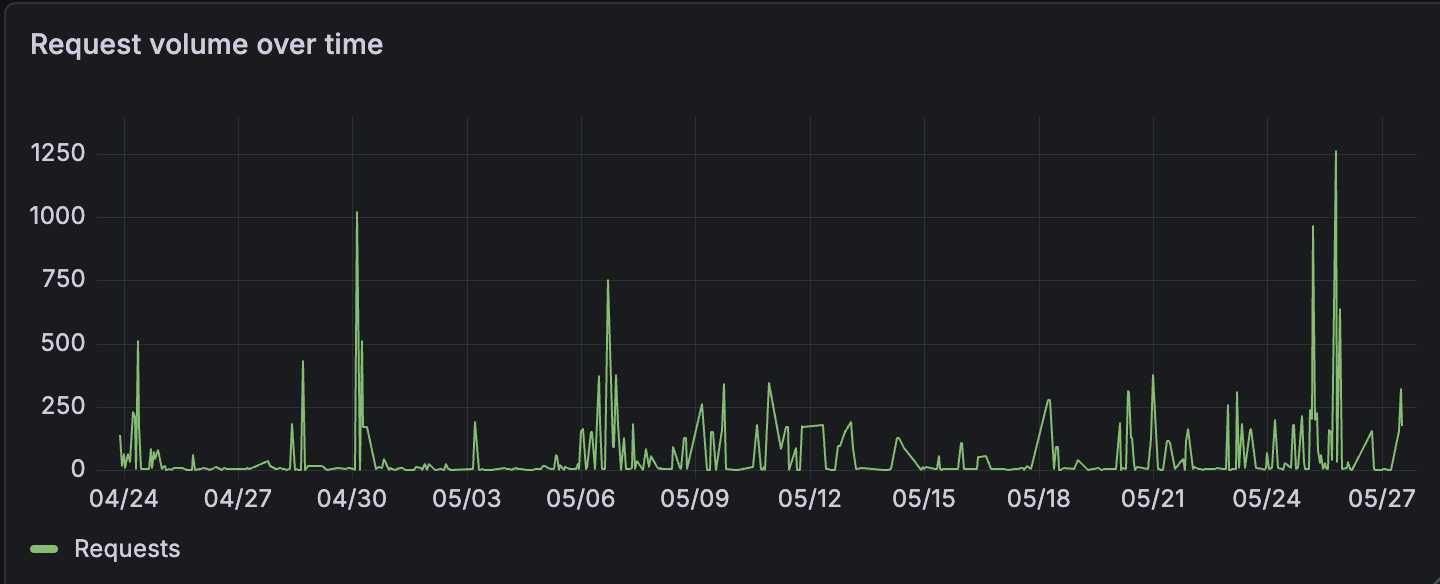
First request came in within minutes of the ingress going live. The domain wasn’t linked anywhere, nothing organic had reached the service yet, I hadn’t even tested it myself. Didn’t matter.
This is just how it works. Shodan and Censys are constantly scanning large chunks of the IPv4 space and they tend to find a fresh IP within hours of it becoming reachable, sometimes much faster.[^5] The traffic also isn’t uniform; it arrives in clumps separated by quieter stretches, which is more or less what you’d expect from a small number of high-throughput scan operators cycling through ranges rather than a lot of unrelated people poking around independently.
So that’s the volume answer: a lot, more or less immediately, in waves. The next question is what specifically they were trying to fetch.
What Were They Looking For?
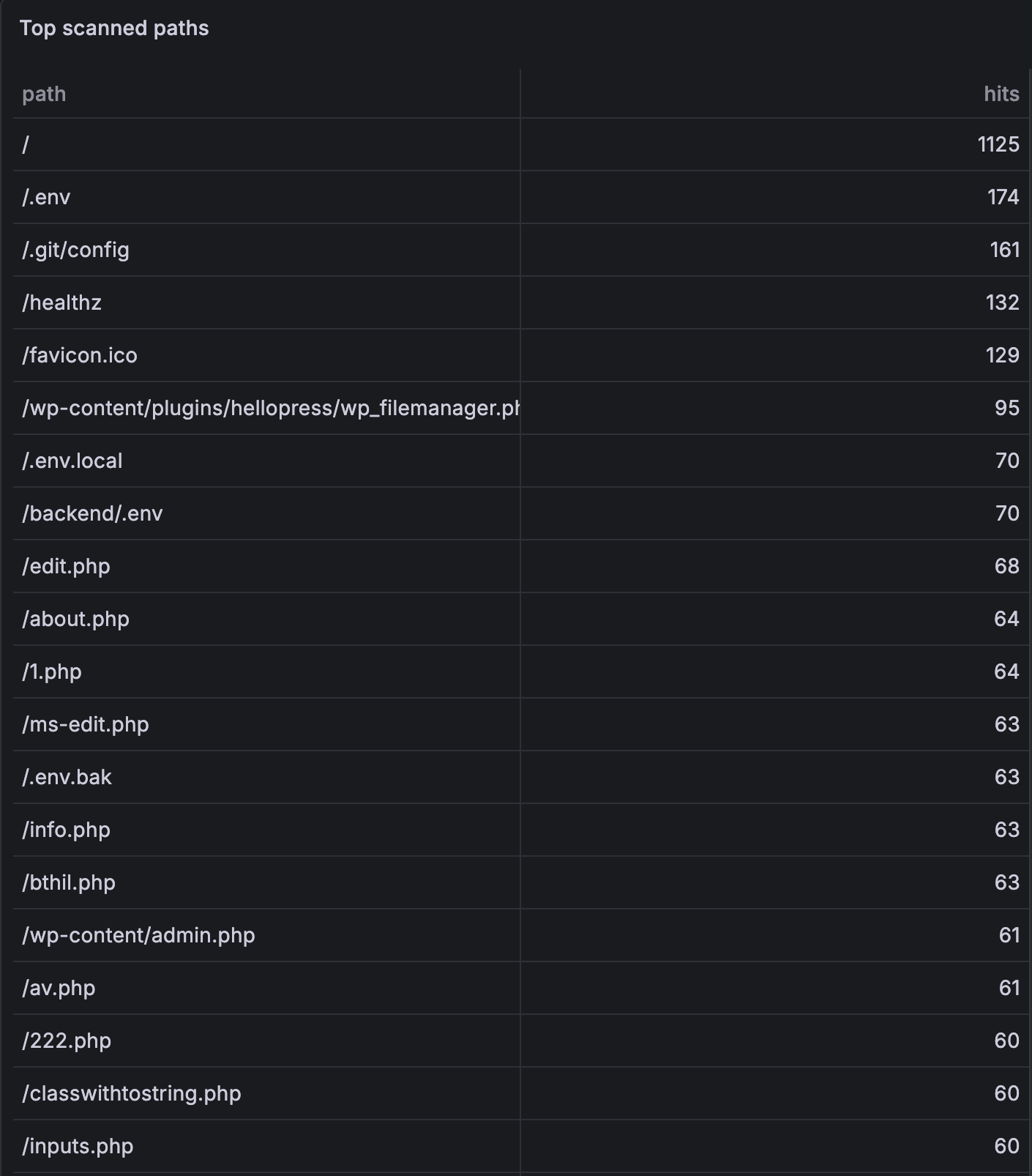
The path list reads like a greatest hits of misconfiguration. Two things absolutely dominate the top of the chart:
/.env— 174 hits, by a huge margin the most-probed path of all. And it’s not just plain.enveither — pretty much every conceivable variant got hit too:.env.local,.env.production,.env.bak,.env.swp,.env.old,.env.save,.env.docker,.env.staging,.env.dev,.env.example,.env.dist, plus the same idea repeated in every subdir you can imagine (/admin/.env,/api/.env,/backend/.env,/erp/.env,/laravel/.env,/wordpress/.env, …). There were even path-traversal versions like/..%2f..%2f.envand/static../.env, and a Windows-specific gem:/.env::$DATA, which abuses NTFS alternate data streams to sneak past some path filters. Whoever wrote that scanner ruleset really wanted somebody’s env file./.git/config— 161 hits. If you accidentally ship your.gitdirectory next to your app, an attacker can walk the object database and reconstruct your entire source tree from it. They also probed/.git/HEAD,/.git/credentials,/.git-credentials, and a bunch of/.git/logs/refs/...paths.
After those two, the rest of the popular targets are roughly what you’d expect:
/wp-content/plugins/hellopress/wp_filemanager.php— 95 hits for one extremely specific path. That’s a known unauthenticated file-upload bug in a WordPress filemanager plugin; the sheer number of probes for this exact path tells you how productive the exploit must have been at some point./phpinfo.phpand/info.php, both around 55–65 hits, plus a long tail of/php-info.php,/_phpinfo.php,/admin/phpinfo.php,/test/phpinfo.php, etc. — an exposedphpinfo()is basically a free dump of paths, environment variables, modules, and a depressing amount of context.- The expected pile of WordPress paths:
/wp-admin,/wp-login.php,/wp-config.php,/wp-config.php.bak,/wp-config.php.swp,/wp-config.php.old. WordPress. Always WordPress. Even on services that are very clearly not WordPress. /.aws/credentialsand all its friends (/root/.aws/credentials,/aws/credentials,/.s3cfg,/aws.env). Cloud keys are the prize.- Spring Boot Actuator probes:
/actuator/env,/actuator/heapdump,/actuator/configprops. A misconfigured Actuator just cheerfully hands over the entire application environment, secrets included. /_ignition/execute-solution— CVE-2021-3129, the Laravel Ignition unauthenticated RCE that briefly destroyed everyone’s day in 2021.- A surprising amount of very specific n8n enumeration:
/rest/login,/rest/users,/rest/oauth1-credential/auth,/rest/oauth2-credential/auth,/rest/credentials-for-node,/rest/workflows,/rest/executions. Somebody out there is very specifically going after self-hosted n8n instances and the credentials stored in them.
I also had a bunch of ${jndi:ldap://...} payloads showing up in headers and query strings. That one stucked with me and probably with a lot other Java developers 😄. Log4Shell is years old at this point, and the scanners couldn’t care less. They keep a list of every payload that has ever worked anywhere and they just keep trying everything on the list, indefinitely.
The weirdest part is the long tail of random-looking PHP filenames — /bthil.php, /xwx1.php, /fone1.php, /xltt.php, /0x.php, /100.php, /222.php, and dozens of others, each hit anywhere from 4 to 60 times. These aren’t generic probes. These are scanners checking for the specific filenames that previous breaches have used as backdoor webshells. If any one of those files actually existed on your server, it would mean somebody had already compromised it. The scanner is essentially shopping for other people’s victims.
Now the obvious follow-up: that’s what they want — but who’s actually sending the requests?
Who Was Asking?
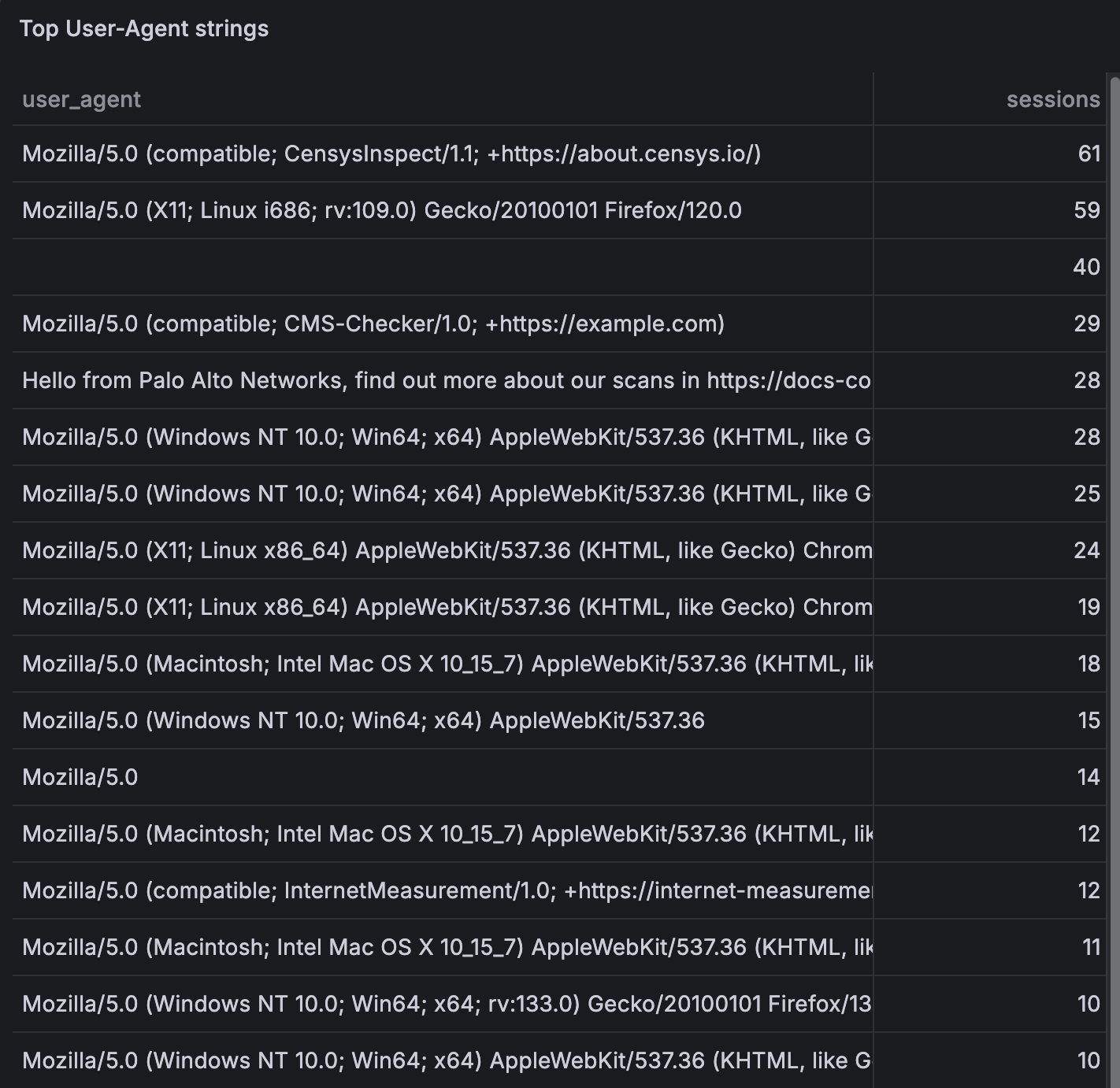
The User-Agent strings were honestly kind of touching in their honesty. Top of the list by a wide margin was Mozilla/5.0 (compatible; CensysInspect/1.1; +https://about.censys.io/) — that’s Censys, one of the continuous-scan operators I name-dropped earlier in the post, with a link to their own website embedded in the UA explaining what they’re doing. In retrospect this is exactly the company you’d expect to see at the top of the list.
Sliding further down it gets even more on-the-nose. Several requests came in with Hello from Palo Alto Networks, find out more about our scans in https://docs-cortex.paloaltonetworks.com/r/1/Cortex-Xpanse/Scanning-activity as their entire User-Agent string. That’s not a User-Agent, that’s a press release. Cortex Xpanse is Palo Alto’s attack-surface management product — apparently the polite way to do internet-wide scanning is to leave a friendly note in every request.
A few others that just outed themselves the same way:
Mozilla/5.0 (compatible; CMS-Checker/1.0; +https://example.com)— someone’s CMS fingerprinter, with a placeholder URL they never got around to filling inMozilla/5.0 (compatible; InternetMeasurement/1.0; +https://internet-measurement.com/)— reads like an academic measurement projectvisionheight.com/scan Mozilla/5.0 (Macintosh; ...) Chrome/126.0.0.0 Safari/537.36— somebody who decided to splice their scanner name onto the front of an otherwise normal UA, which is honestly the most unhinged optionokhttp/5.3.0— Android’s default HTTP client, also used by a lot of Java/Kotlin tooling. Whatever sent those requests didn’t set a UA at all
Then there’s the long tail: a parade of perfectly normal-looking Chrome and Firefox strings like Mozilla/5.0 (Windows NT 10.0; Win64; x64) AppleWebKit/537.36 (KHTML, like Gecko) Chrome/131.0.0.0 Safari/537.36 and twenty variations on it. Some of those might be real humans clicking around, but the more interesting ones look like Chrome and then make a single request to /.env within 30 ms, no referrer, no cookies, zero follow-up requests for any assets. Real browsers don’t behave like that. If you’ve ever actually watched real browser traffic you know what real browser traffic looks like, and a lot of these aren’t it.
So far this is all roughly the same kind of traffic: someone (or something) doing a single-pass scan against a single subdomain and moving on. The reason for running five personas instead of one was so I could see what wasn’t that.
Cross-Domain Reconnaissance
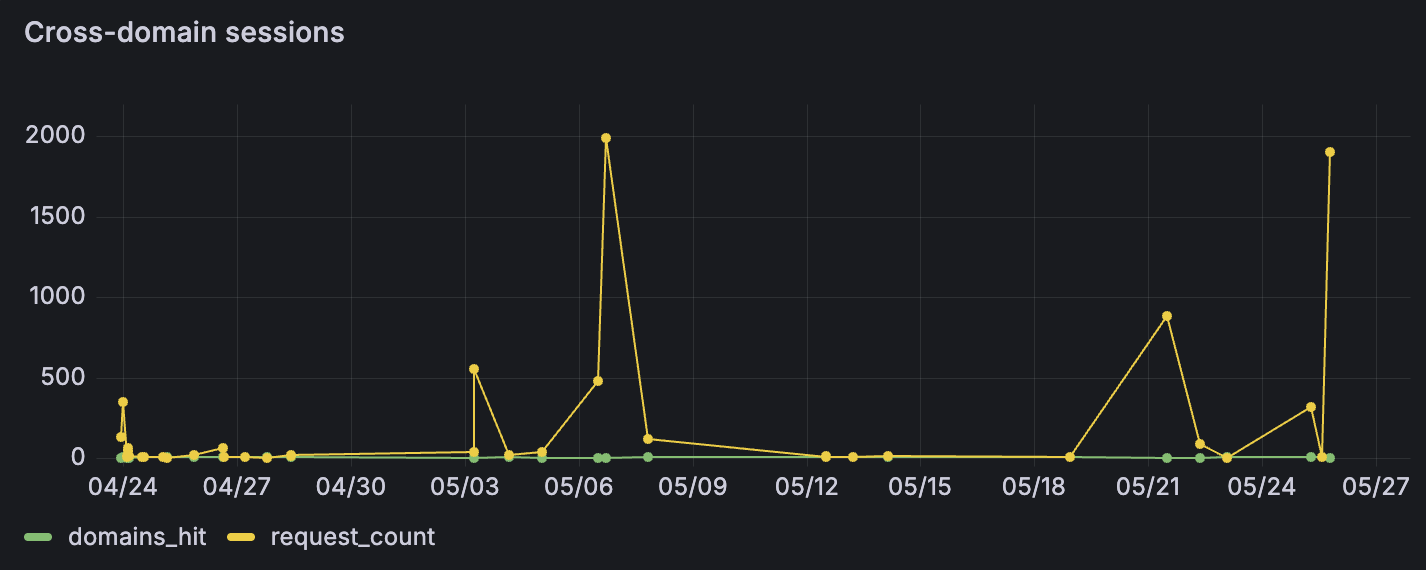
A decent chunk of sessions ended up on more than one subdomain. The more interesting question is how they found all five in the first place. A few possibilities:
- Certificate transparency logs. All five subdomains share a TLS certificate, and that certificate is visible to anyone watching crt.sh. Mining CT logs is a fairly standard subdomain enumeration trick.
- DNS brute-forcing. Throw common prefixes at the base domain (
shop.,erp.,hr., …) and see what resolves. - IP correlation. Find the IP through other scanning, then enumerate the HTTP vhosts running on it.
Whichever method they used, the cross-domain sessions behaved noticeably differently from the bulk noise. They tried more paths, sent more POSTs, stuck around longer. Less drive-by scanning, more someone actually walking the building and checking every door. Which is the whole reason the multi-persona setup is worth the slight extra hassle — a single-target honeypot would just have flattened all of this into the same generic traffic.
What I Learned
Going back to the questions I had at the start: yes, everyone is hitting me; yes, they found me immediately; and what they want is essentially the same handful of misconfigurations they’ve been looking for for years. None of that was really surprising in shape. The thing that did surprise me was how specific everything was.
The path lists scanners use aren’t random and they aren’t particularly creative either. They’re an accumulated catalogue of every misconfiguration that has ever paid off somewhere, kept up to date as new CVEs land. Your service doesn’t have to be known or important to receive exploitation attempts, it just has to be reachable.
A few things that hit differently actually watching them happen rather than reading about them:
Obscurity really does buy you nothing. I knew this in theory, but watching it happen to a service I had literally just deployed — no DNS history, no external links, nothing — felt different. The IP got scanned within minutes regardless.
A convincing lure pulls in better data. The sessions that got a plausible login form and a believable 401 back stayed around longer and probed more paths than the ones that hit a 404 and moved on. How good the deception is directly affects how much signal comes back.
Running five personas instead of one was almost free in terms of operational cost. Five DNS records, one ingress config, a small Go map. What it gives you back is being able to see correlated cross-domain behaviour, which a single-target setup just doesn’t surface.
A lot of scanner traffic announces itself. Quite a few requests came in with User-Agents that named the exact tool being used. The operators either don’t know or don’t care that the tooling identifies them. Either way it’s useful information — the IP can be behind a VPN, but the tooling fingerprint sticks.
[^1]: Moore, D., Paxson, V., Savage, S., Shannon, C., Staniford, S., & Weaver, N. (2003). Inside the Slammer Worm. IEEE Security & Privacy, 1(4), 33–39. The “internet background radiation” framing comes from the related network telescope work: Moore, D., Shannon, C., Brown, J., Voelker, G. M., & Savage, S. (2006). Inferring Internet Denial-of-Service Activity. ACM Transactions on Computer Systems, 24(2), 115–139.
[^2]: Durumeric, Z., Wustrow, E., & Halderman, J. A. (2013). ZMap: Fast Internet-Wide Scanning and Its Security Implications. In USENIX Security ‘13, pp. 605–620.
[^3]: Bou-Harb, E., Debbabi, M., & Assi, C. (2014). Cyber Scanning: A Comprehensive Survey. IEEE Communications Surveys & Tutorials, 16(3), 1496–1519.
[^4]: Spitzner, L. (2003). Honeypots: Tracking Hackers. Addison-Wesley. Classic definition: “a security resource whose value lies in being probed, attacked, or compromised.”
[^5]: Durumeric, Z., Adrian, D., Mirian, A., Bailey, M., & Halderman, J. A. (2015). A Search Engine Backed by Internet-Wide Scanning. In ACM CCS ‘15, pp. 542–553.